
What Could We Automate? · Episode 02
Connected Sales & Inventory
From sales history to smarter inventory decisions.
By Walker Small Business Solutions
Your Sales System Already Knows What You've Sold
It's Friday afternoon at an independent retail shop. The owner is reviewing the week's sales while checking inventory levels and preparing the next supplier order.
The point-of-sale system has recorded every transaction, but deciding what to purchase still means checking shelves, reviewing sales reports, and comparing stock levels with outstanding supplier orders.
Some products sell steadily throughout the year. Others move faster during particular seasons. Occasionally, an item becomes unexpectedly popular, leaving the business scrambling to replenish stock.
Experience helps, but bringing all that information together takes time.
What if your sales information could help determine what to stock, when to reorder, and how much to purchase?
Your business may already be collecting much of the information needed to make those decisions.
Connecting Sales and Inventory
Walker SBS could develop a custom application that connects your existing sales reporting with a more comprehensive inventory management system.
Where supported integrations or authorized data exports are available, the application could match sales transactions to inventory records using product codes, SKUs, or barcodes.
Instead of reviewing separate reports, staff could work with a connected view of product sales, stock levels, and purchasing activity.
Each product record could bring together:
- Historical sales and average weekly demand.
- Current stock quantities across one or more locations.
- Minimum and maximum inventory levels.
- Outstanding purchase orders and expected deliveries.
- Supplier information and typical delivery times.
- Seasonal sales patterns and changing demand.
The first step would be to assess how your existing systems store and exchange information. The solution could then be designed around the data available and the way your business operates.
Beyond Basic Minimum and Maximum Quantities
Many businesses use minimum and maximum inventory levels to decide when to reorder products.
Those limits provide a useful starting point, but sales history can make purchasing decisions more informed.
Imagine a popular product normally sells 20 units per week. As seasonal demand increases, sales begin climbing toward 40 units per week.
A traditional inventory system may continue using the same reorder settings, even though customer demand has changed.
A connected application could recognize that trend and highlight the need to review purchasing quantities.
It could consider:
- Average sales: How quickly a product typically sells.
- Sales trends: Whether demand is increasing or declining.
- Seasonality: Predictable changes during different times of the year.
- Supplier lead times: How long replenishment normally takes.
- Incoming stock: Inventory already ordered but not yet received.
- Stock limits: Business-defined minimums, maximums, and safety stock.
For example, if a product is selling faster than expected and the next supplier delivery is two weeks away, the system could identify a potential shortage and recommend a purchasing quantity.
If sufficient stock is already on order, it could account for that rather than recommending unnecessary additional purchases.
Forecasts remain estimates, and purchasing decisions would still be reviewed by authorized staff.
The goal isn't to remove human judgment. It's to provide better information for making decisions.
Inventory From Anywhere
Inventory management doesn't need to happen exclusively from a computer in the back office.
Imagine receiving a shipment and using a tablet or mobile phone to scan a product barcode, confirm quantities, or photograph a new item for the product catalogue.
A manager working remotely could review the same inventory information from a laptop.
Authorized users could:
- Check stock quantities and product details.
- Scan barcodes and catalogue new products.
- Capture and store product photographs.
- Record inventory counts and adjustments.
- Review stock across multiple locations.
- Investigate inventory discrepancies.
- Review suggested purchasing quantities.
All devices would work with the same centrally maintained inventory records.
When an update is synchronized, the current information becomes available to other authorized users. If connectivity is interrupted, an appropriately designed application could retain entries locally until synchronization is possible.
One dataset. Multiple devices. Consistent information.
Turning Reports Into Business Decisions
A connected inventory dashboard could turn everyday sales information into practical recommendations.
Instead of manually searching through multiple reports, the owner could open a dashboard displaying:
- Fast-moving and slow-moving products.
- Average sales over selected periods.
- Products approaching minimum stock levels.
- Items at risk of running out before replenishment.
- Seasonal increases or decreases in demand.
- Suggested reorder quantities.
- Inventory exceptions requiring attention.
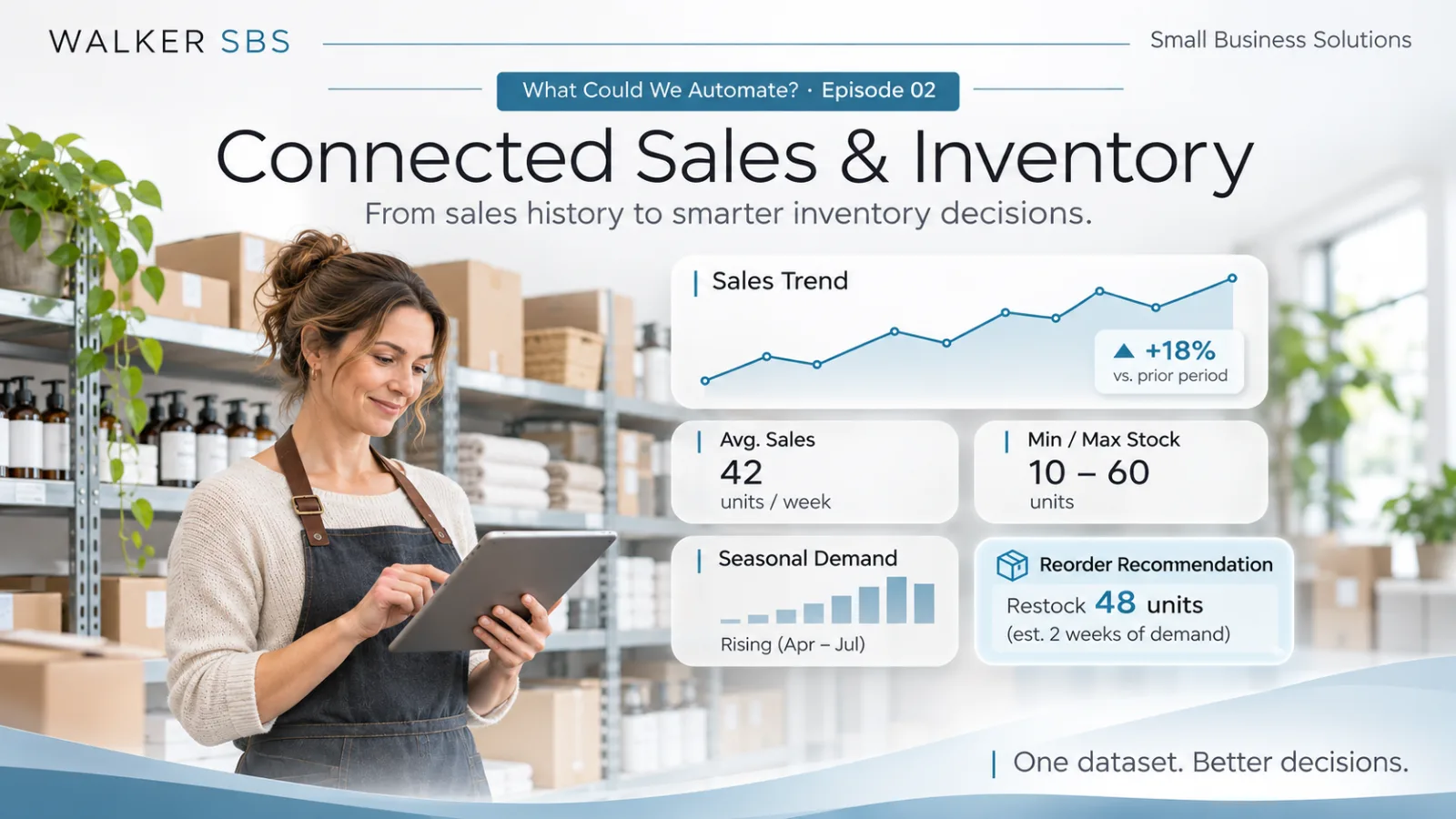
For example, the dashboard might show that a product averages 42 units sold per week, with a recommended reorder quantity based on current stock, expected demand, and supplier delivery schedules.
The owner could review the recommendation, investigate the supporting information, and decide whether to place an order.
The dashboard figures shown in the accompanying illustration are fictional examples intended to demonstrate how this information could be presented.
The real advantage is moving from simply collecting business information to using it to support better decisions.
Built Around Your Existing Operations
A connected inventory solution doesn't necessarily mean replacing your existing point-of-sale system.
A practical first phase might use authorized sales imports to build an inventory dashboard for one store or product category.
If the immediate concern is knowing what to reorder before the next supplier deadline, that could be the starting point.
As the business evaluates the results, additional capabilities could be introduced:
- Automated sales and inventory analysis.
- Mobile product cataloguing.
- Purchasing recommendations and approval workflows.
- Seasonal demand forecasting.
- Multi-location inventory management.
- Supplier and purchasing integrations.
The application could evolve as business needs become clearer, rather than requiring a complete system replacement from the beginning.
One Dataset. Better Decisions.
Your business already collects valuable information through everyday sales.
Connecting that information with inventory, supplier records, and purchasing activity can help identify what needs attention, what to reorder, and where stock levels may need adjustment.
And because the information is centrally maintained, the same records can support reporting, purchasing, mobile access, and inventory management without maintaining separate copies.
Enter it once. Use it everywhere.
At Walker Small Business Solutions, we develop custom business applications designed around how your company operates.
Could something like this improve your business?
Explore our custom business software and workflow automation services, including system integration. See how we scope and build an application, then contact Walker SBS to discuss your operations.
Contact Walker SBS